SQL
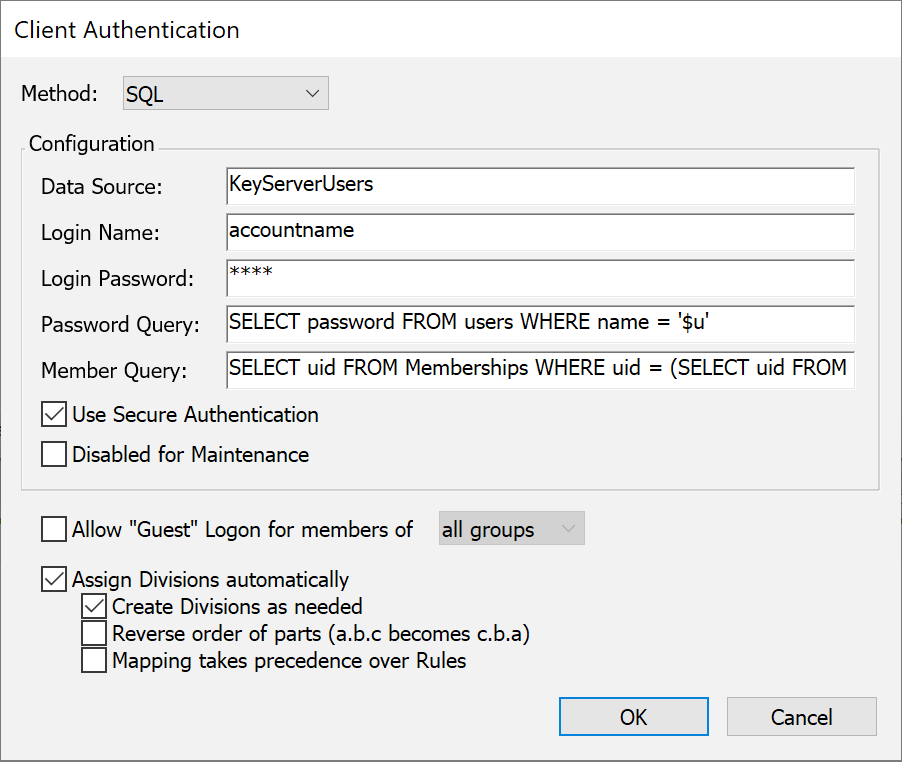
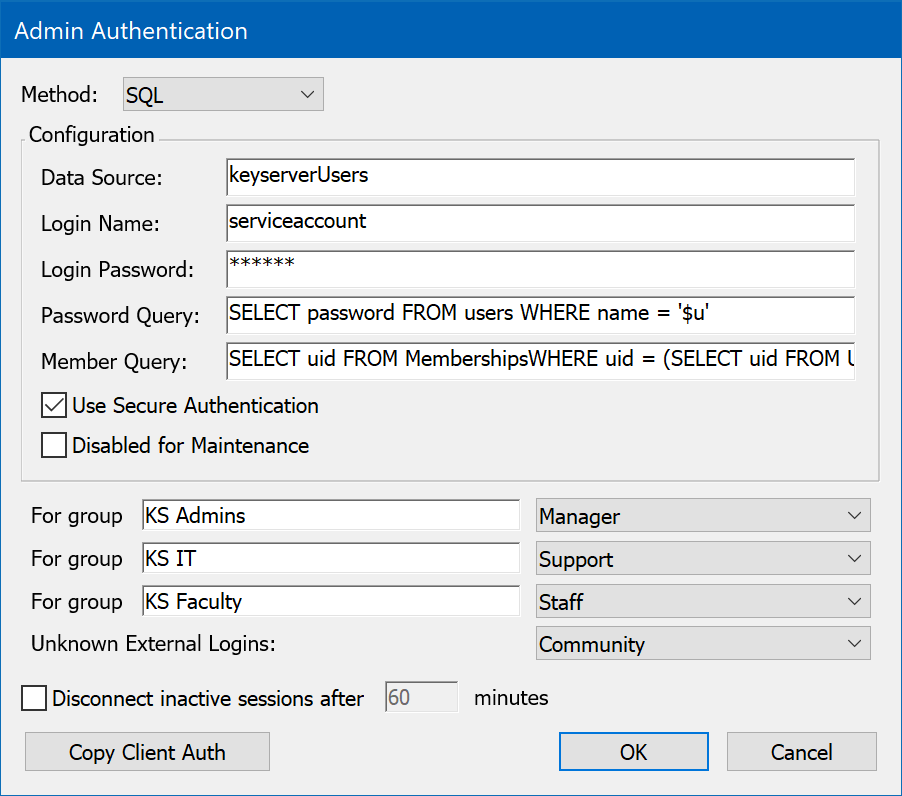
Sites that maintain a database of users in an SQL database can set up KeyServer to use that database for authentication and authorization. This authentication module uses ODBC to connect to the database, so any ODBC data source that supports SQL can be used. However, since there is no convention for storing and retrieving passwords in an SQL database, passwords sent from KeyServer to the SQL server will likely be sent over the network as clear text when you are using this authentication module (depending on the specific implementation of the ODBC driver). Unless you must support KeyAccess versions 5.0.5 or older, be sure to check the Use Secure Authentication option so that passwords will be securely transmitted from KeyAccess to KeyServer.
To use this authentication module, you should already be familiar with SQL and your chosen RDBMS, and you must know how to set up an ODBC Data Source.
To configure the SQL authentication module, you must first set up the ODBC data source that is to be used. This can be done within the ODBC Data Source control panel on Windows. Once the data source is set up, enter the data source name (not the name of the database -- that was specified when setting up the data source), and the login name and password if they are required (sometimes these can be specified when you set up the data source). KeyServer will only need read (select) access to the database. In the example above, the data source was named “KeyServer Users”, although you can give the data source any name you wish. You can also use an existing data source if that is appropriate.
For example, consider the simple database design pictured below. This database has three tables: one containing user names and passwords, with a unique numeric “user ID” as the primary key; one containing group names and a unique “group ID” as the primary key; and the third being a “junction table” that defines a many-to-many relationship between users and groups. This third table defines each group's set of member users. Note that your database does not need to have this same structure. Your database can have any structure you wish, as long as you can form SQL queries that return the information needed by KeyServer, in the formats described below.
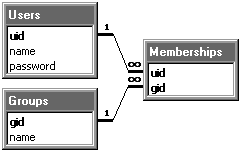
Simple SQL database design
When KeyServer verifies a user's password, it submits an SQL query that must return exactly one row, with the first column containing the password. KeyServer compares this column to the password that the user provides. In our example, this query will require only the “Users” database, using the SQL query:
SELECT password FROM Users WHERE name = '$u'
In the above query, the “$u” will be replaced by the name provide by the user. This query must return exactly one record, otherwise the authentication will fail. Since KeyServer only checks the password in the first column, that is the only column that is requested in the query.
When KeyServer needs to check if a user is a member of a group, it submits an SQL query that must return at least one row, although the data in the row can be anything. In our example, we use a complex query that uses the Users and Groups tables to look up the user and group IDs, and then the Memberships junction table to check for membership. The SQL query looks like this:
	SELECT uid FROM Memberships
		WHERE uid = (SELECT uid FROM Users WHERE name = '$u')
		AND gid = (SELECT gid FROM Groups WHERE name = '$g')
In the above query, the “$u” will be replaced by the user name and “$g” will be replaced by the group name. KeyServer checks that this query returns at least one row. The “uid” column is returned, but this is ignored and could be anything.
If your RDBMS is not able to do sub-selects, then you can most likely work around this with a slightly more complex query. For example, the above member query could be re-written as:
	SELECT Memberships.uid FROM Memberships,Users,Groups
		WHERE Memberships.uid = Users.uid
		AND Users.name = '$u'
		AND Memberships.gid = Groups.gid
		AND Groups.name = '$g'
Some additional values can be used in queries (some of these are only available with version 6.2.0.2 or newer of the SQL authentication module):
- $u - user name
- $c - computer name
- $i - computer id
- $d - computer id starting with second character (e.g. the MAC address portion of a MAC address based id)
- $e - portion of computer id starting after first slash, if it contains one
- $g - group name
When forming a query, remember that your RDBMS might be case sensitive on table names and/or column names. To be safe, always use the same capitalization in your queries as is used in the table definitions in your RDBMS.
When entered in the Authentication dialog box, the Password Query is limited to 127 characters and the Member Query is limited to 255 characters. If your queries need to be longer than this, you can direct the SQL authentication module to read a query from a text file. To do this, enter “@” as the first character of the query, followed by the name of the file in which the query is stored. The file must be stored in the Authentication Modules folder within the KeyServer Data Folder. The entire contents of the file will be used as the query, and separate files must be used if you choose to store both the Password and the Member Query in files.
If you do not want KeyServer to require a password, leave the Password Query field empty. If you do not want KeyServer to check for group memberships, leave the Member Query field empty.
The SQL module will not Assign Divisions automatically.