Body
This module is very similar to other OIDC methods like Azure, Okta, AD FS, PingIdentity, and the generic OpenID Connect, but has specific functionality in it to work with DUO. You will also want to review the general Auth Module document for more information on authentication as a topic.
Because this authentication is handed off to the provider, it offers full SSO and MFA support per the provider configuration.
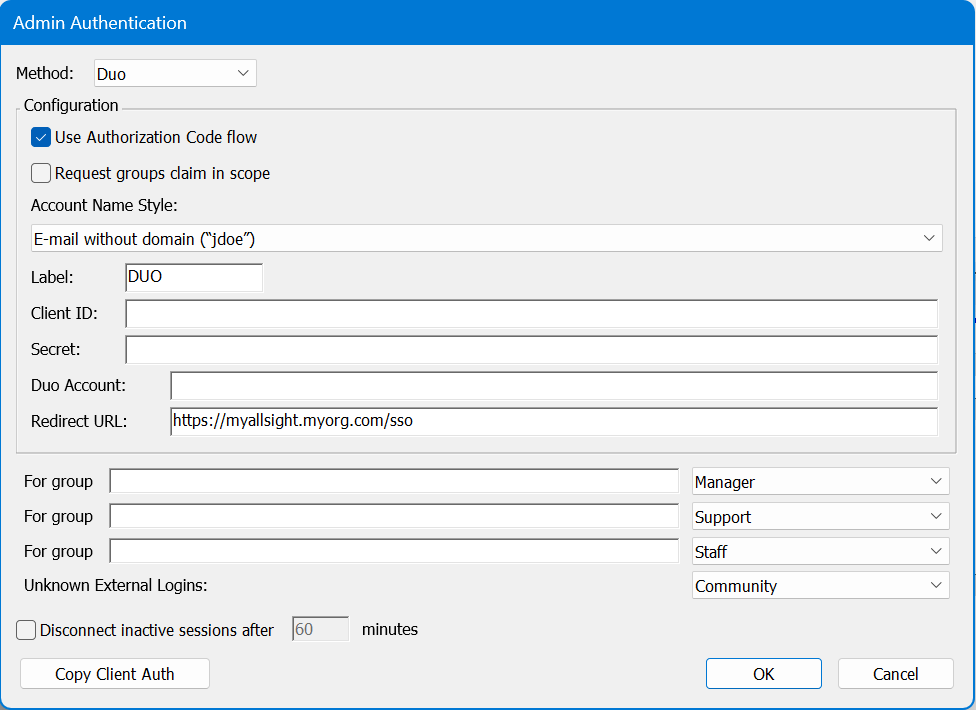
Generally speaking, you will want to enable Use Authorization Code Flow. If there is a problem, you can disable this as a test of falling back to another code flow method.
Account Name Style is partially cosmetic but can have a functional impact. This allows you to set how the account is displayed in the Web UI upper corner, as well as how it is recorded in logs, and shows in the Account list in the platform. This can be important to avoid collisions. If you use Full Name for example and two people are John Smith, we have an issue. But if you use UPN Without Domain and that results in jasmith and jbsmith, then there is no issue because those are unique names for account records.
The Label is arbitrary and will be displayed on the login page. In General using the name of the service (e.g. Google or Azure) as the label is expected.
The Redirect URL should always be https://[your.keyserver.hostname]/sso
Configuration
This module was specifically added for the DUO implementation of OIDC. It allows for more robust interaction than the generic open ID connect module. The Client ID, Secret, and DUO Account information comes from your DUO instance. We do not have any more detailed walk through at this time for setting up the DUO side as these concepts should be fairly common for the administrator.